Back
Back

Markuro AI
A unified workspace for orchestrating multiple top-tier AI models.
Check out
ROLE
Product Designer
DURATION
3-4 Months
PLATFORM & DOMAIN
SaaS / Web Application
Generative AI / LLM
SKILLS
Product Design
User Research
Interaction Design
THE CONTEXT
The current generative AI landscape is powerful but heavily siloed. Users are forced to fragment their workflow across multiple platforms—juggling ChatGPT for reasoning, Claude for coding, and Imagen for image/video generation.
THE PROBLEM
The "Copy-Paste" Loop: There is no interoperability. If a user starts in Gemini but needs Claude for coding, they must manually migrate their data, context, and files—wasting time and losing nuance. Projects are trapped within specific tools. Moving from ChatGPT to Claude requires manual "copy-pasting" of prompts and re-uploading files, forcing the user to restart the conversation every time.
Cognitive Overload: Context switching between fragmented tools destroys focus. The friction of adapting to varying UIs makes deep work impossible.
Subscription Fatigue: Users are forced to pay for multiple $20/month subscriptions (~$60/mo total) just to access the specific strengths of each model.
THE GOAL
One Price. All Models. Any Workflow.
We are building the definitive AI companion that adapts to how you work. Whether you need a quick answer or a dedicated workspace for a complex project, our "All-in-One" interface delivers:
Flexible UX: Seamlessly switch between Classic Chat for speed and Agentic Canvas for deep, structural work.
Total Aggregation: Access text, image, and video generation tools without ever leaving the platform.
Smart Continuity: Personalized Memory ensures your context and preferences follow you everywhere.
Zero Friction: No more tab-switching or subscription stacking. Just one cohesive experience.
SOLUTION
A unified Multi-LLM platform integrating the world's leading AI models into a cohesive interface tailored for Vietnamese users.
VID
Switch between any top-tier model of your choice, and pin your favorites for easier access
VID
A smart, cohesive interface with a low learning curve, built to boost user interaction with AI
IMG
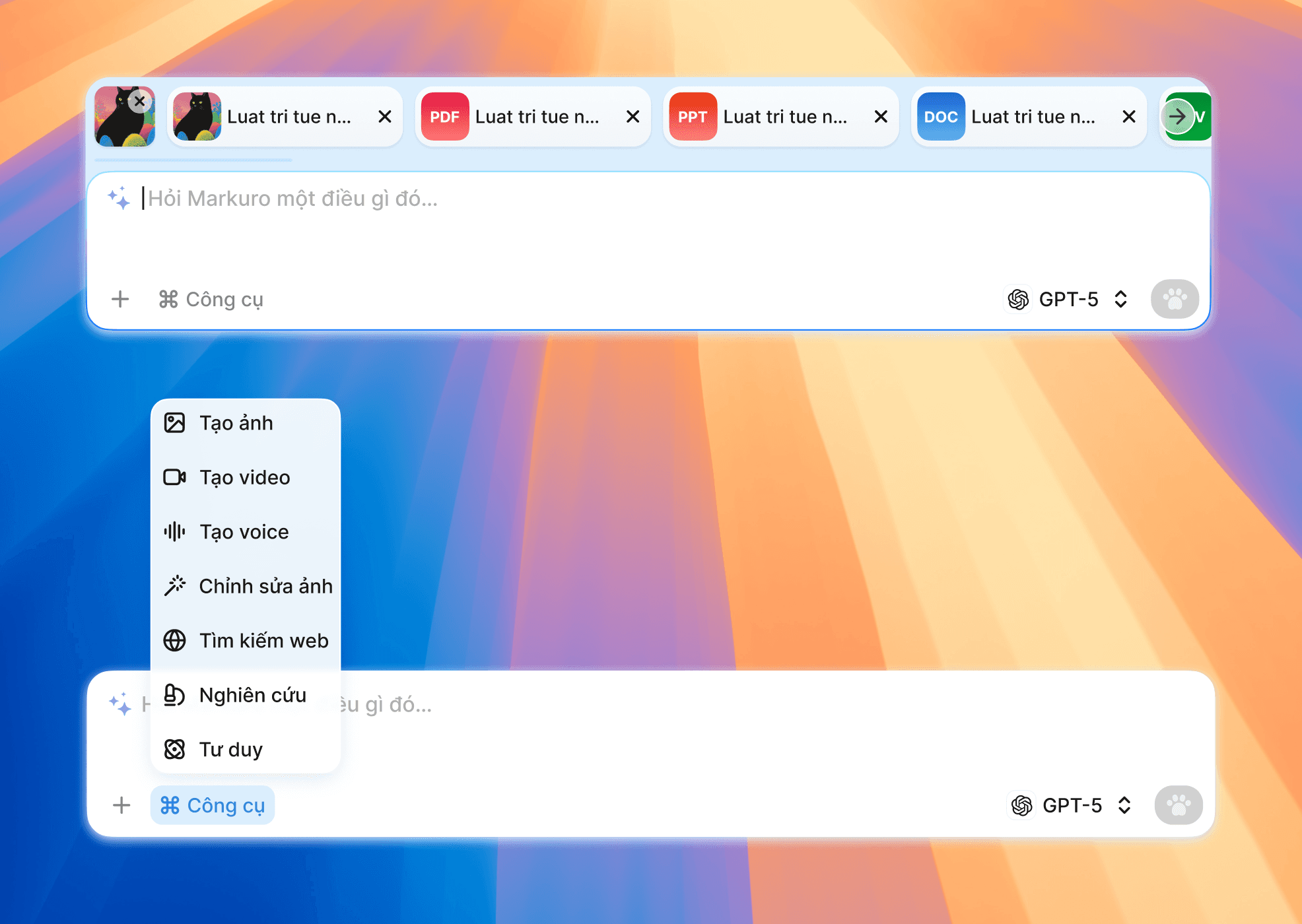
Powerful tools all in one single chat interface
THE OUTCOME
IMG
Your smart 4-paws companion

Acquired 100+ users within 24 hours of the Open Beta launch
Selected for SIHUB's 2025 Innovation Program
Runner-up, Track A – Next Wave of Startups 2025
HOW IT STARTED
The Origin of Markuro Idea
The Concept: A Spatial & Autonomous Workspace
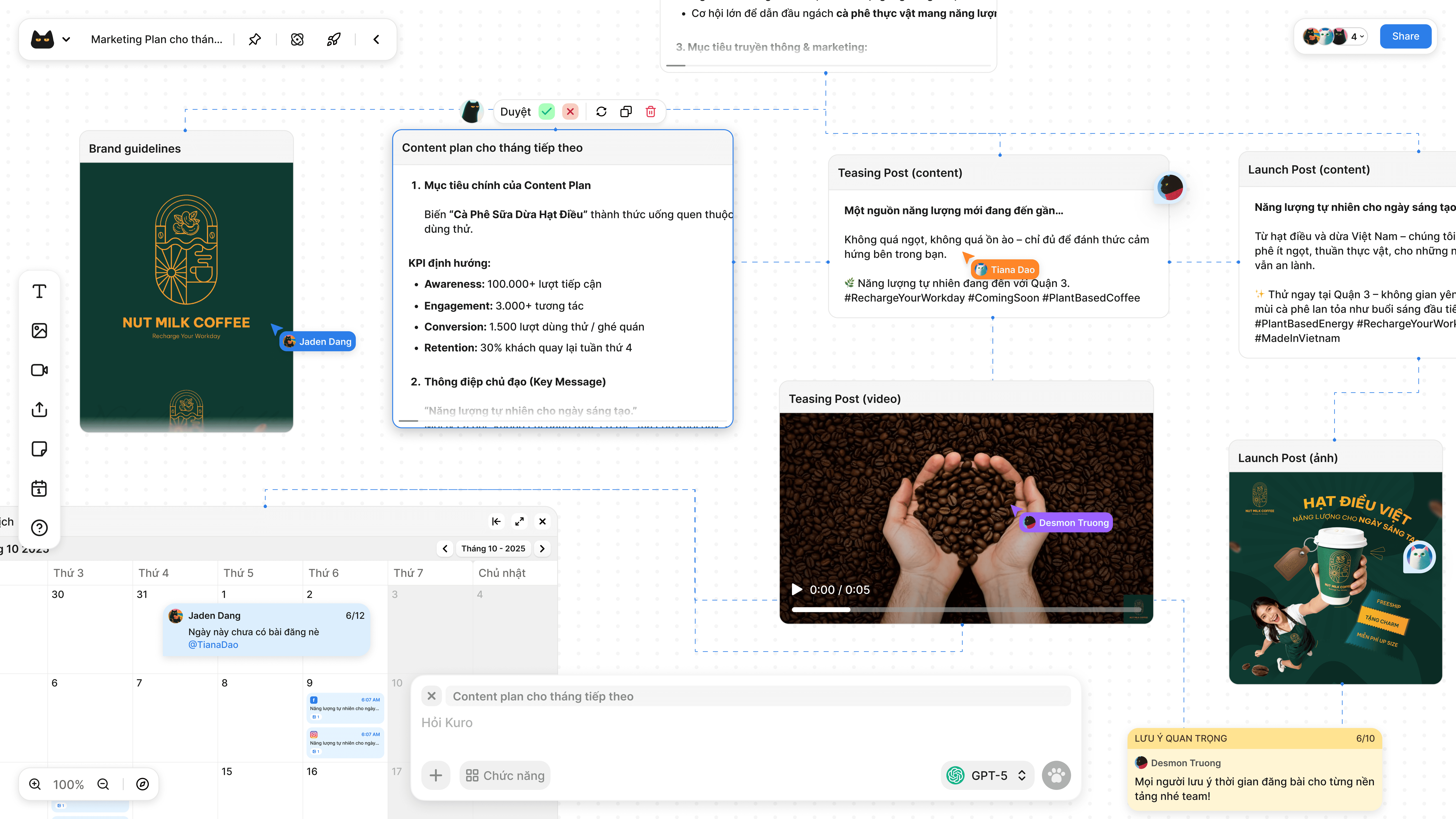
My initial vision for Markuro was to replace fragmented chat tabs with a Visual Node Canvas. This allows users to "wire" different AI models together to create Autonomous Agents that handle entire workflows—from deep research and content creation to automatic social media posting—all within a single, unified interface.
IMG
Original AI Agent Canvas UI Design
HOW IT CHANGED
Strategic Pivot: Prioritizing User Adoption
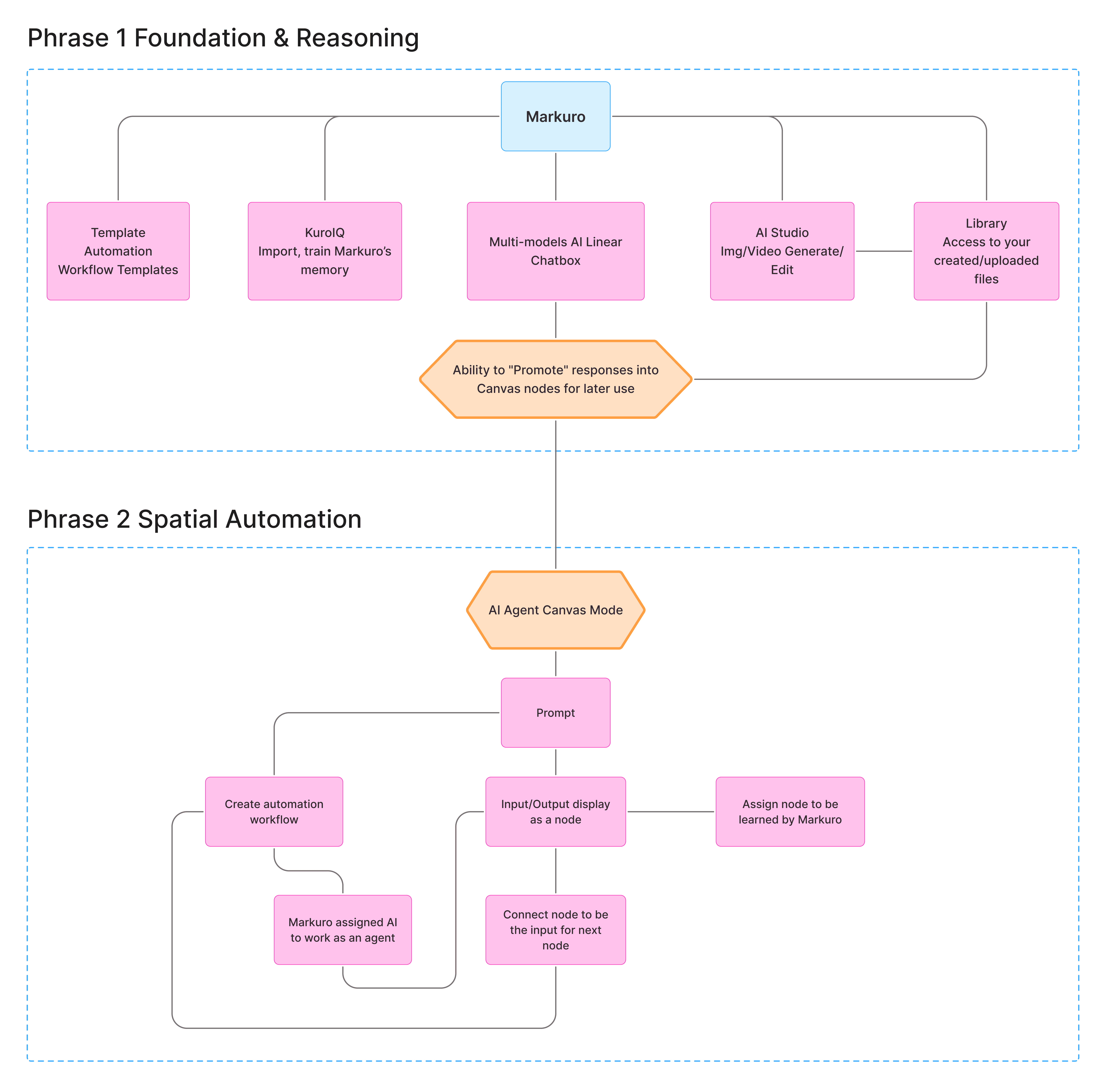
After extensive testing and internal review, we decided to move the "Agentic Canvas" to the second phase of development. While the canvas is our ultimate vision, we recognized that the "Node-based" mental model is still a novel concept for most users.
Under the influence of ChatGPT, Claude, and Gemini, the linear Chat Interface remains the gold standard for user comfort. To reduce the learning curve and accelerate our Time-to-Market (TTM), we shifted our initial focus to a refined Chat-first experience. This allows us to:
Shipping Fast: Deploy a core product that users can use immediately with zero friction.
User Education: Gradually transition users from basic chat reasoning to complex, autonomous agentic workflows as the product matures.
Resource Efficiency: Focus our engineering efforts on perfecting the AI's "Agentic" capabilities before introducing the spatial UI.
IMG
The Roadmap: Evolving from Linear Chat & Reasoning to a fully Automated AI Agent Canvas.
COMPETITOR RESEARCH / INSPIRATIONS
IMG
Other Competitors
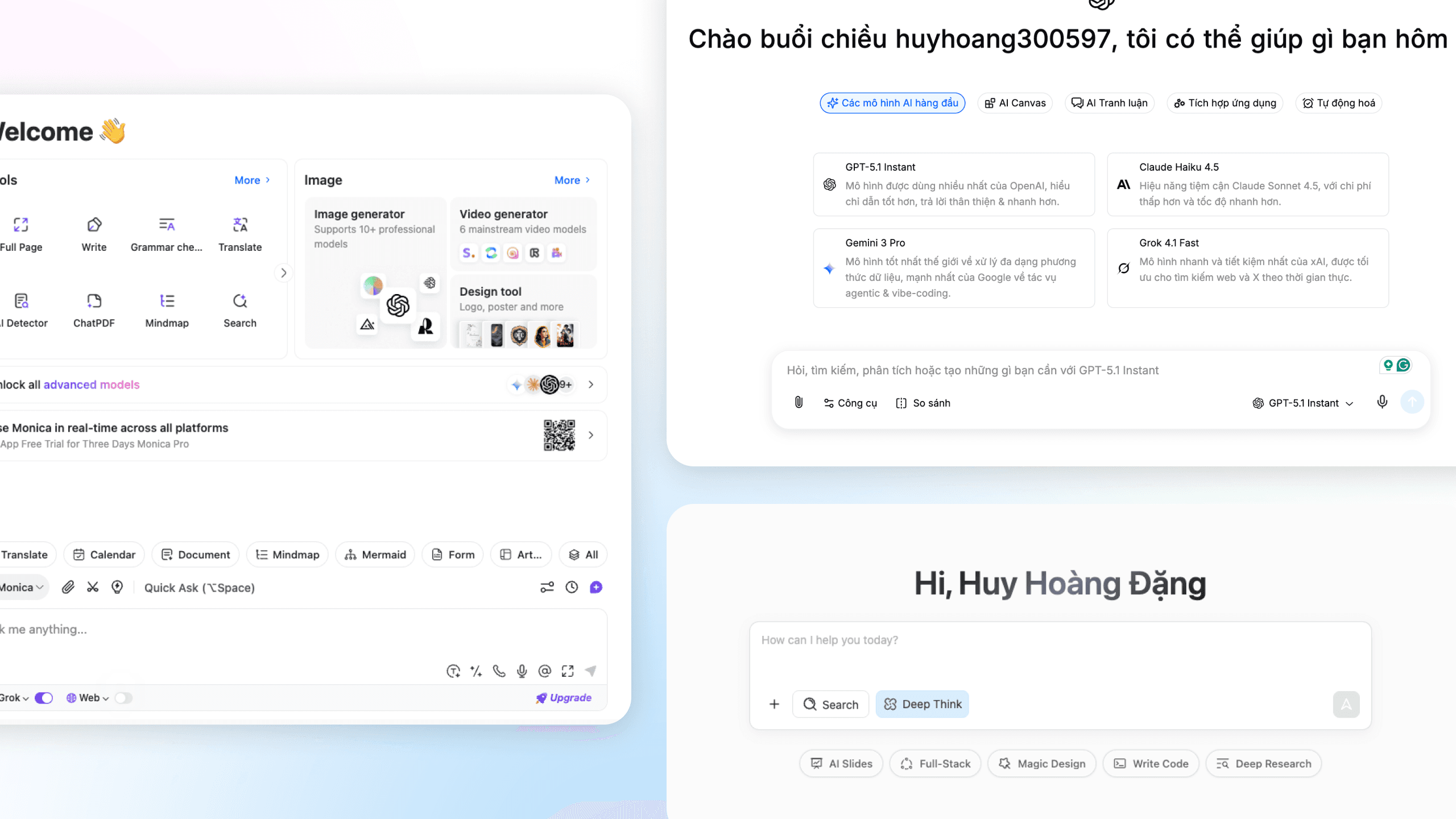
Multi-model interfaces can easily overwhelm everyday users. Our goal was to bridge the gap between high-end technical power and an intuitive, user-friendly experience
IMPROVE ON THE GO
IMG
New chatbox interface upgrade
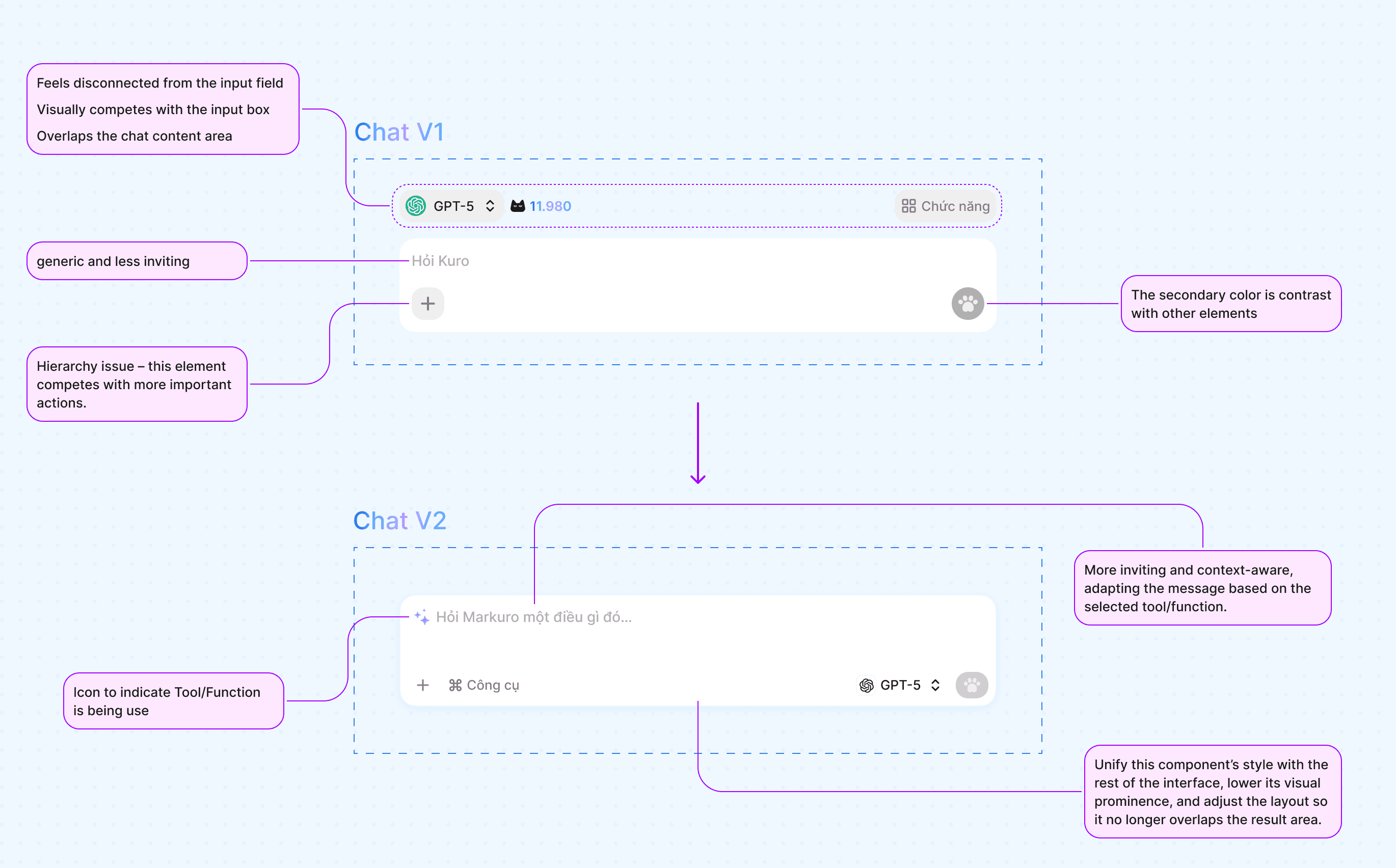
Navigating multiple AI models is confusing. Users are often overwhelmed by choice and frustrated by technical limitations, such as a model's inability to handle both complex reasoning and visual creation in a single session
IMG
New model selector interface
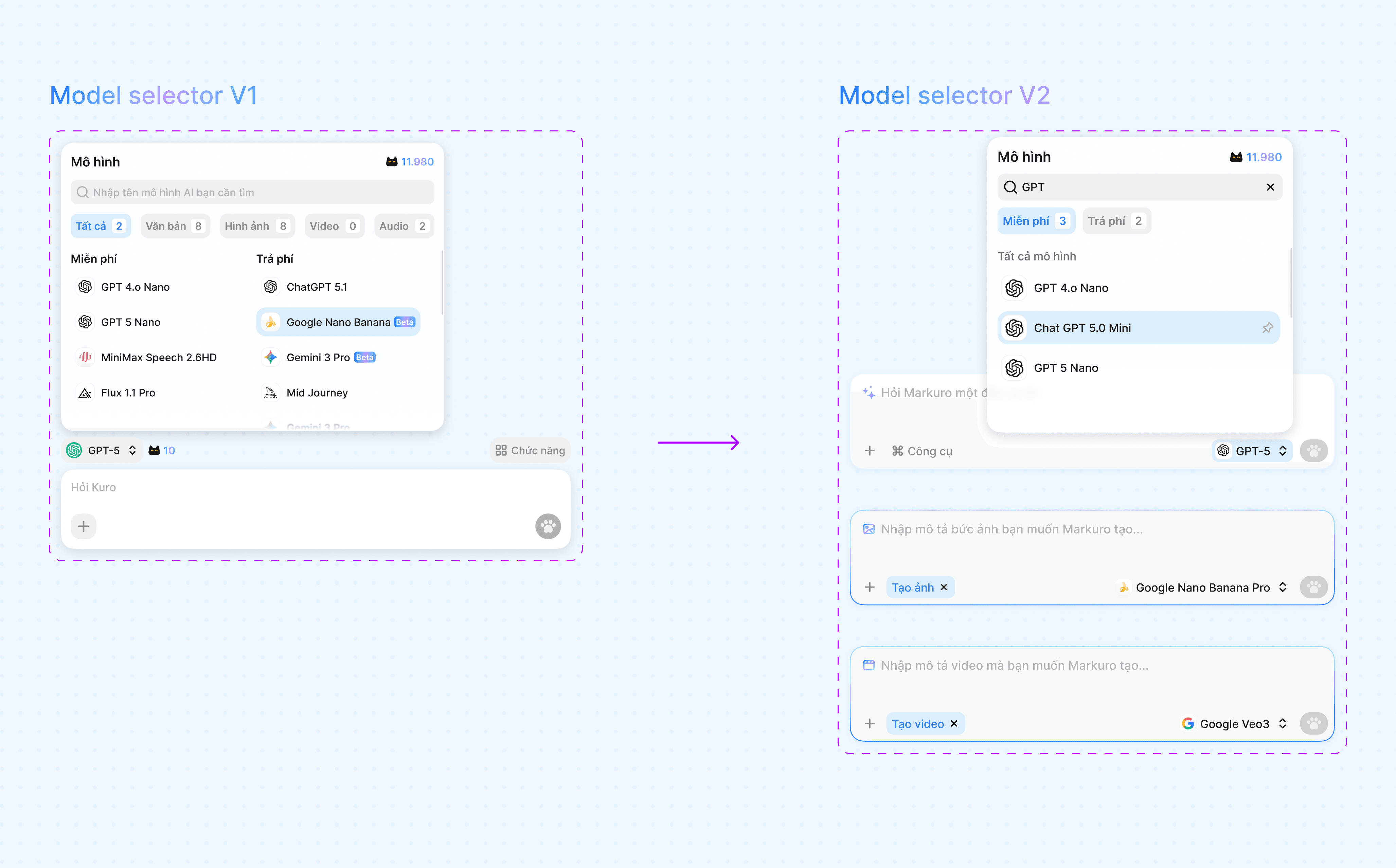
The Solution: Contextual Filtering Instead of overwhelming users with a raw list of every available model, we implemented Contextual Filtering.
Now, the system dynamically narrows the model list based on the user's selected function. For example, if a user selects the "Image Generation" tool, the interface automatically filters out text-only models, showing only those with visual capabilities. This eliminates decision fatigue and prevents errors before they happen.
VID
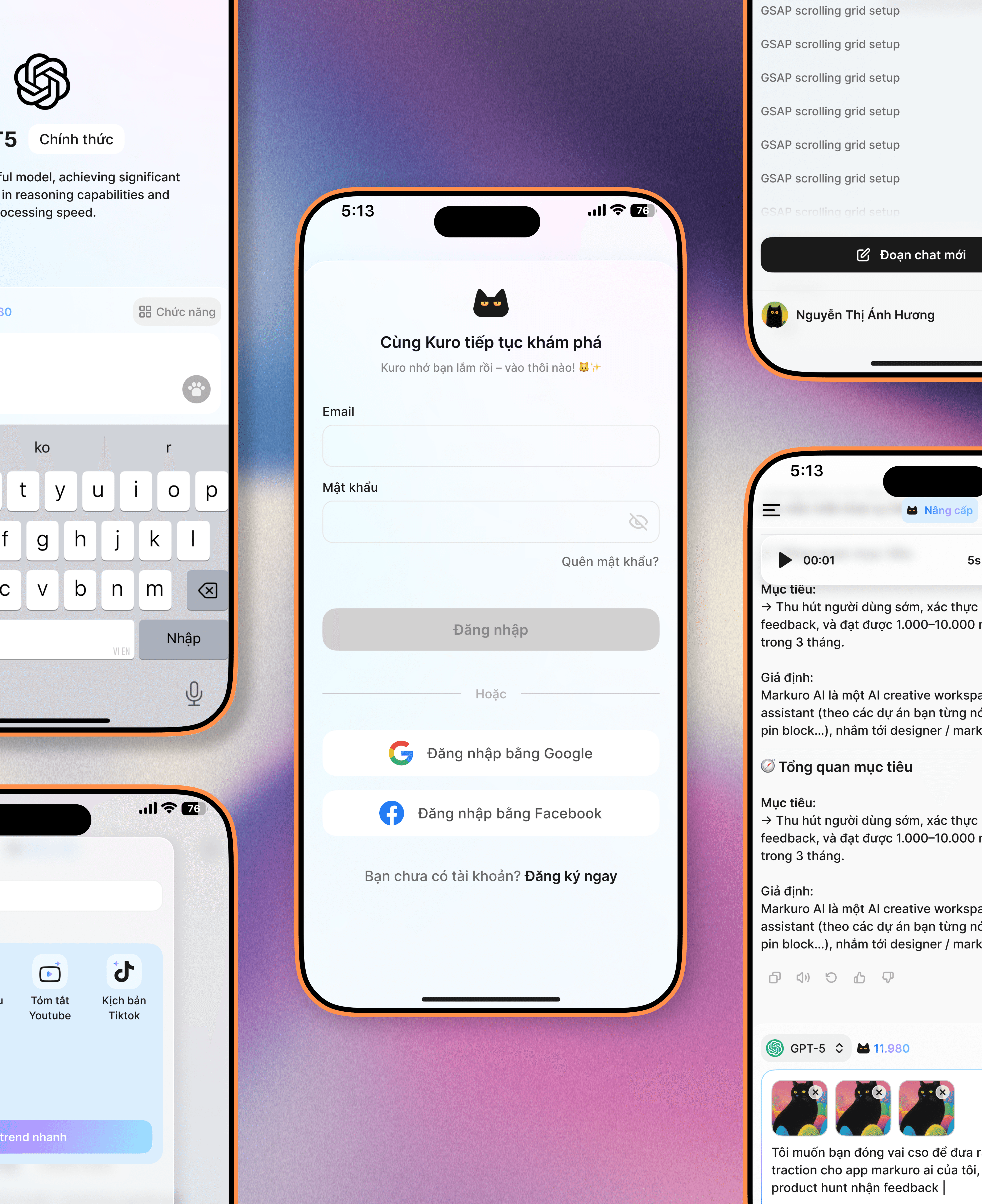
Responsive First Design Approach
I adopted a Mobile-First strategy to ensure the product functions perfectly on any device. By building a flexible component library that automatically adapts to different screen sizes, I significantly reduced design time and minimized errors during the developer handover process
MORE UI DESIGN STUFF
IMG
Component-Driven Design System
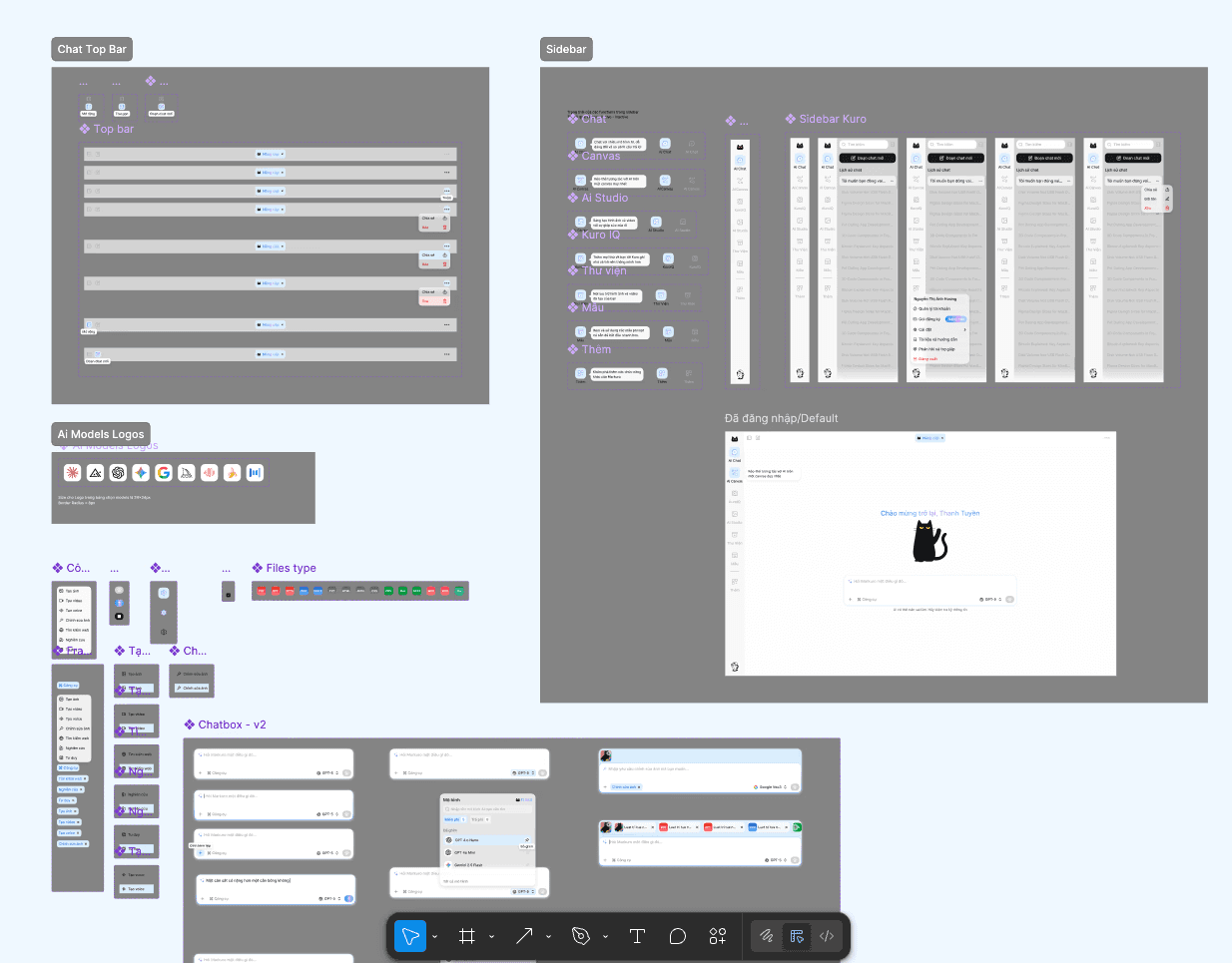
By utilizing a strict component library, I eliminated visual inconsistencies. Every element was designed once and reused everywhere, ensuring that the engineering team always had a 'single source of truth' to build from, which drastically reduced bugs and UI errors
IMG
Every scenerios are prepared
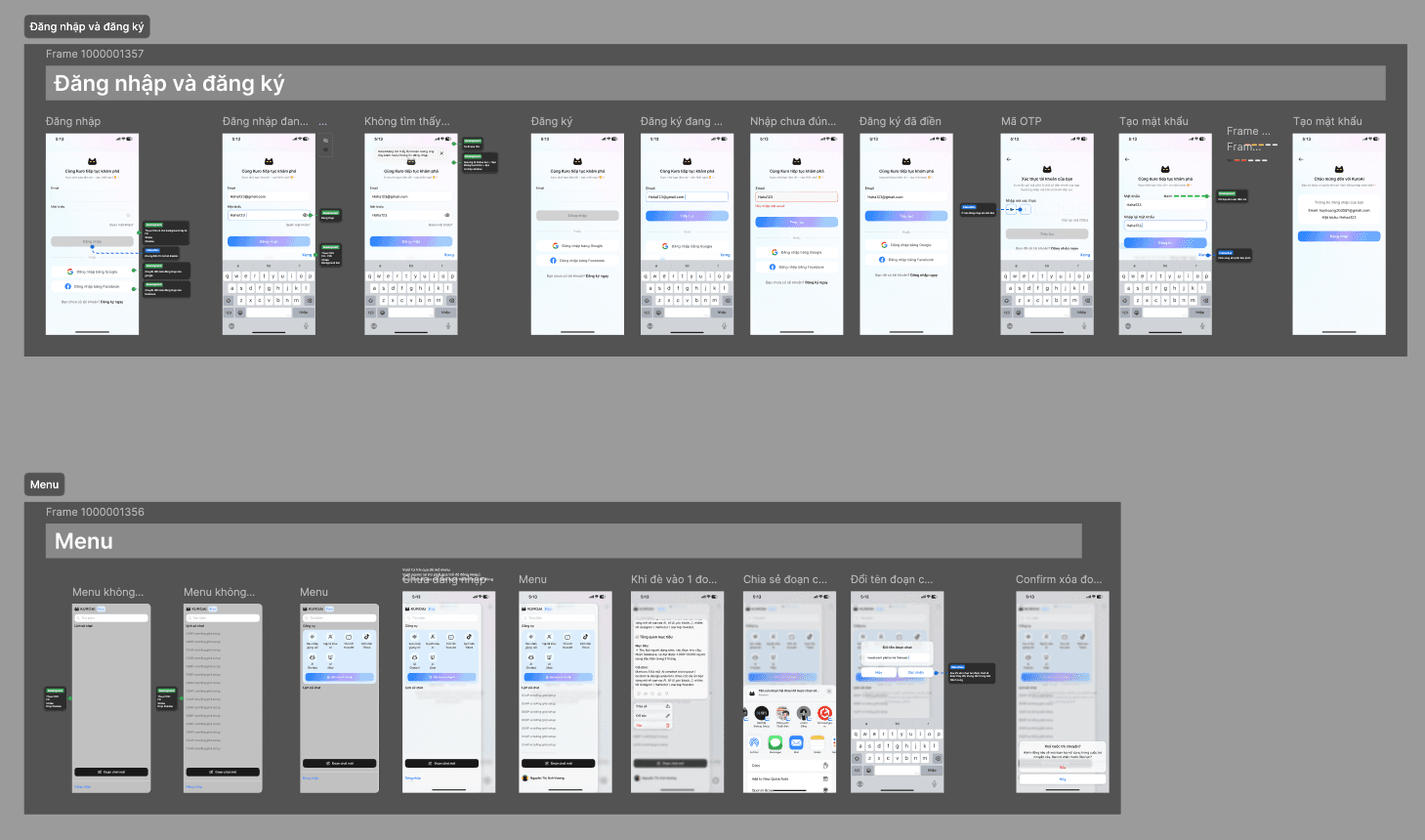
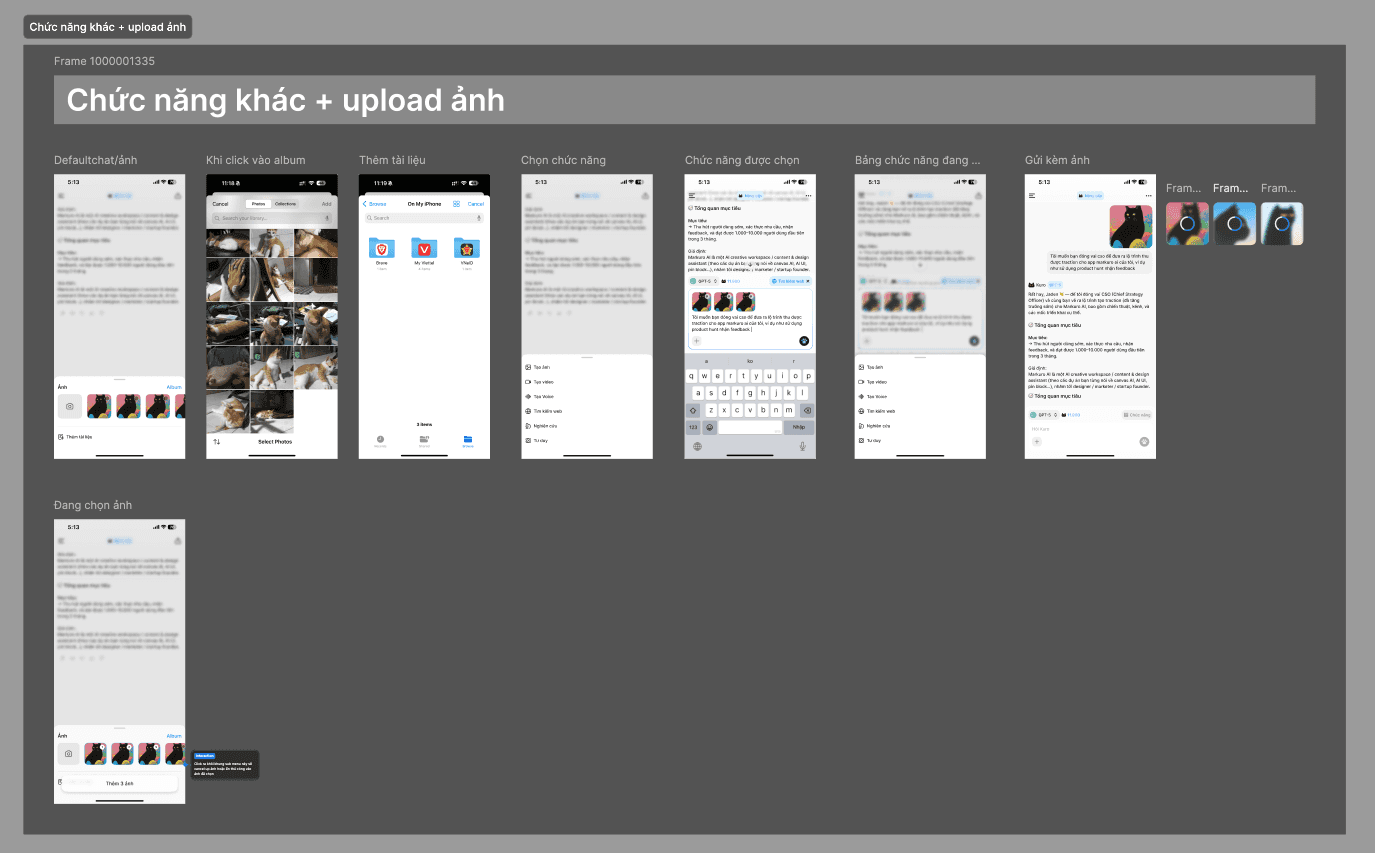
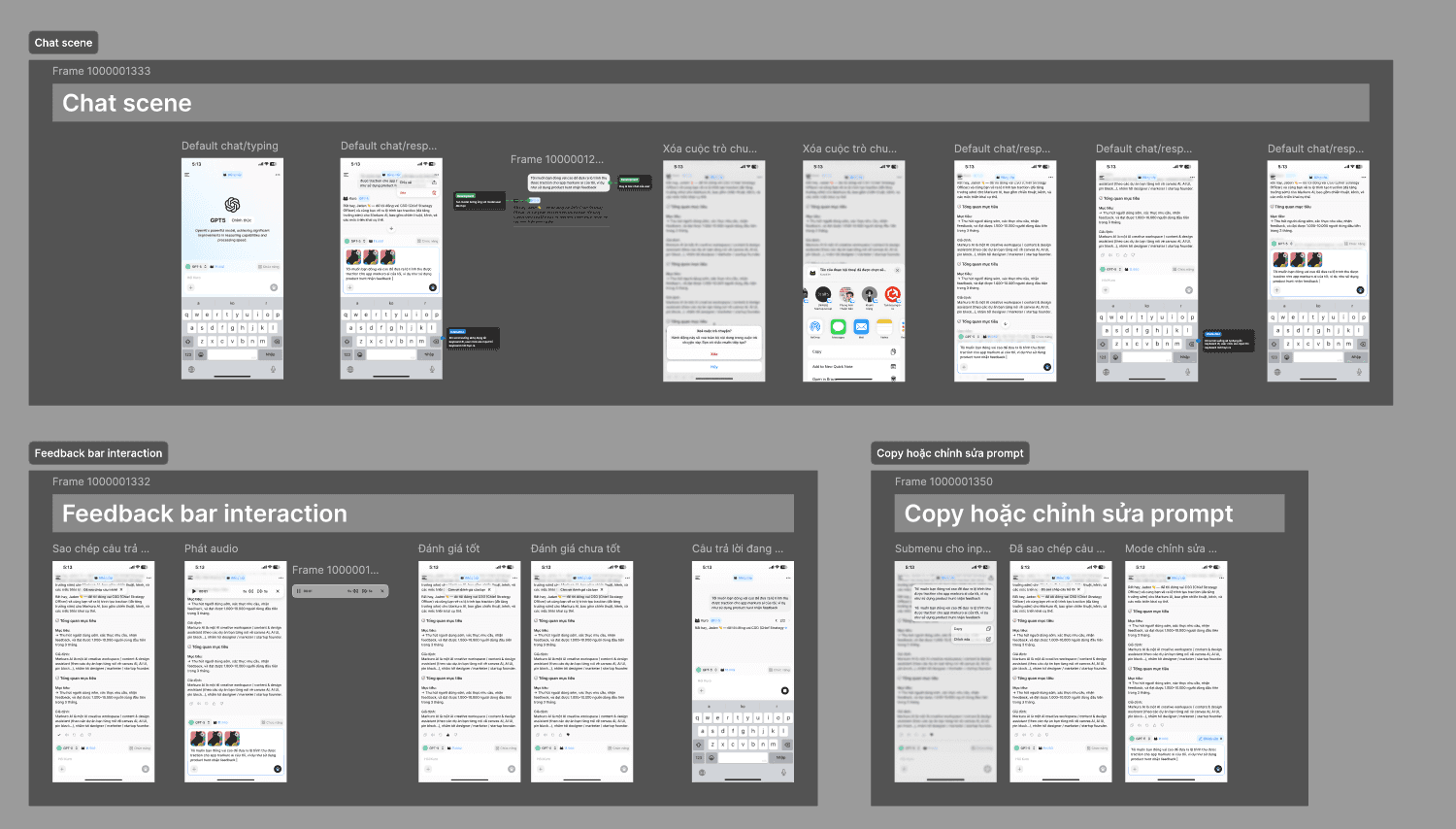
Leaving Nothing to Chance "I went beyond the 'happy path' to design every possible user scenario. From error validation in the sign-up process to empty states in the menu, I documented every interaction to ensure a seamless experience and a zero-guesswork handover for developers."
KEY TAKEAWAY
Keep cutting it down to MLP
We avoided the trap of a 'feature-heavy' MVP. Instead, we ruthlessly prioritized the Minimum Lovable Product—focusing on fewer features but polishing them to perfection. This ensured our first users didn't just use the product, they enjoyed it.
Ready for change
We didn't fall in love with our first solution. When testing showed that the 'Canvas' view was too complex for new users, we pivoted immediately to the 'Chat' interface. This flexibility allowed us to align with user needs rather than forcing a design that wasn't working.
Defining New Patterns
Designing for AI means solving problems that didn't exist two years ago. We approached this by staying open-minded, testing various interaction patterns (text, voice, drag-and-drop) to find the most intuitive bridge between human intent and machine execution.
Markuro AI
A unified workspace for orchestrating multiple top-tier AI models.
Check out
ROLE
Product Designer
DURATION
3-4 Months
PLATFORM & DOMAIN
SaaS / Web Application
Generative AI / LLM
SKILLS
Product Design
User Research
Interaction Design
THE CONTEXT
The current generative AI landscape is powerful but heavily siloed. Users are forced to fragment their workflow across multiple platforms—juggling ChatGPT for reasoning, Claude for coding, and Imagen for image/video generation.
THE PROBLEM
The "Copy-Paste" Loop: There is no interoperability. If a user starts in Gemini but needs Claude for coding, they must manually migrate their data, context, and files—wasting time and losing nuance. Projects are trapped within specific tools. Moving from ChatGPT to Claude requires manual "copy-pasting" of prompts and re-uploading files, forcing the user to restart the conversation every time.
Cognitive Overload: Context switching between fragmented tools destroys focus. The friction of adapting to varying UIs makes deep work impossible.
Subscription Fatigue: Users are forced to pay for multiple $20/month subscriptions (~$60/mo total) just to access the specific strengths of each model.
THE GOAL
One Price. All Models. Any Workflow.
We are building the definitive AI companion that adapts to how you work. Whether you need a quick answer or a dedicated workspace for a complex project, our "All-in-One" interface delivers:
Flexible UX: Seamlessly switch between Classic Chat for speed and Agentic Canvas for deep, structural work.
Total Aggregation: Access text, image, and video generation tools without ever leaving the platform.
Smart Continuity: Personalized Memory ensures your context and preferences follow you everywhere.
Zero Friction: No more tab-switching or subscription stacking. Just one cohesive experience.
SOLUTION
A unified Multi-LLM platform integrating the world's leading AI models into a cohesive interface tailored for Vietnamese users.
VID
Switch between any top-tier model of your choice, and pin your favorites for easier access
VID
A smart, cohesive interface with a low learning curve, built to boost user interaction with AI
IMG
Powerful tools all in one single chat interface
THE OUTCOME
IMG
Your smart 4-paws companion
Acquired 100+ users within 24 hours of the Open Beta launch
Selected for SIHUB's 2025 Innovation Program
Runner-up, Track A – Next Wave of Startups 2025
HOW IT STARTED
The Origin of Markuro Idea
The Concept: A Spatial & Autonomous Workspace
My initial vision for Markuro was to replace fragmented chat tabs with a Visual Node Canvas. This allows users to "wire" different AI models together to create Autonomous Agents that handle entire workflows—from deep research and content creation to automatic social media posting—all within a single, unified interface.
IMG
Original AI Agent Canvas UI Design
HOW IT CHANGED
Strategic Pivot: Prioritizing User Adoption
After extensive testing and internal review, we decided to move the "Agentic Canvas" to the second phase of development. While the canvas is our ultimate vision, we recognized that the "Node-based" mental model is still a novel concept for most users.
Under the influence of ChatGPT, Claude, and Gemini, the linear Chat Interface remains the gold standard for user comfort. To reduce the learning curve and accelerate our Time-to-Market (TTM), we shifted our initial focus to a refined Chat-first experience. This allows us to:
Shipping Fast: Deploy a core product that users can use immediately with zero friction.
User Education: Gradually transition users from basic chat reasoning to complex, autonomous agentic workflows as the product matures.
Resource Efficiency: Focus our engineering efforts on perfecting the AI's "Agentic" capabilities before introducing the spatial UI.
IMG
The Roadmap: Evolving from Linear Chat & Reasoning to a fully Automated AI Agent Canvas.
COMPETITOR RESEARCH / INSPIRATIONS
IMG
Other Competitors
Multi-model interfaces can easily overwhelm everyday users. Our goal was to bridge the gap between high-end technical power and an intuitive, user-friendly experience
IMPROVE ON THE GO
IMG
New chatbox interface upgrade
Navigating multiple AI models is confusing. Users are often overwhelmed by choice and frustrated by technical limitations, such as a model's inability to handle both complex reasoning and visual creation in a single session
IMG
New model selector interface
The Solution: Contextual Filtering Instead of overwhelming users with a raw list of every available model, we implemented Contextual Filtering.
Now, the system dynamically narrows the model list based on the user's selected function. For example, if a user selects the "Image Generation" tool, the interface automatically filters out text-only models, showing only those with visual capabilities. This eliminates decision fatigue and prevents errors before they happen.
VID
Responsive First Design Approach
I adopted a Mobile-First strategy to ensure the product functions perfectly on any device. By building a flexible component library that automatically adapts to different screen sizes, I significantly reduced design time and minimized errors during the developer handover process
MORE UI DESIGN STUFF
IMG
Component-Driven Design System
By utilizing a strict component library, I eliminated visual inconsistencies. Every element was designed once and reused everywhere, ensuring that the engineering team always had a 'single source of truth' to build from, which drastically reduced bugs and UI errors
IMG
Every scenerios are prepared
Leaving Nothing to Chance "I went beyond the 'happy path' to design every possible user scenario. From error validation in the sign-up process to empty states in the menu, I documented every interaction to ensure a seamless experience and a zero-guesswork handover for developers."
KEY TAKEAWAY
Keep cutting it down to MLP
We avoided the trap of a 'feature-heavy' MVP. Instead, we ruthlessly prioritized the Minimum Lovable Product—focusing on fewer features but polishing them to perfection. This ensured our first users didn't just use the product, they enjoyed it.
Ready for change
We didn't fall in love with our first solution. When testing showed that the 'Canvas' view was too complex for new users, we pivoted immediately to the 'Chat' interface. This flexibility allowed us to align with user needs rather than forcing a design that wasn't working.
Defining New Patterns
Designing for AI means solving problems that didn't exist two years ago. We approached this by staying open-minded, testing various interaction patterns (text, voice, drag-and-drop) to find the most intuitive bridge between human intent and machine execution.
Back to top
